Hemisphere Lights
Hemisphere light is an ambient light source that simulates natural outdoor lighting by blending two colors - one from the sky and one from the ground. It does not cast shadows and is typically used to add soft, realistic ambient illumination across the entire scene.
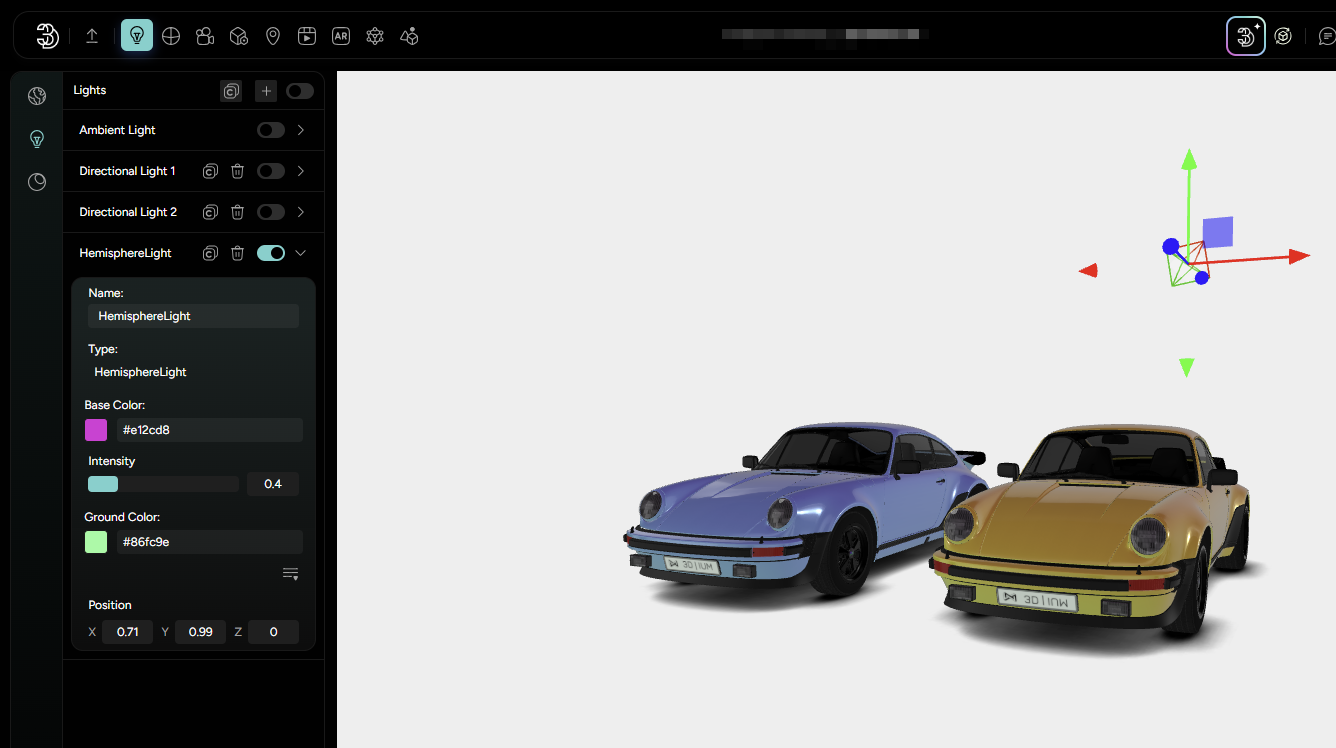
To add a Hemisphere Light, click the plus icon in the Lighting tab. In the pop-up window, name your light and select Hemisphere from the list of available light types. Once added, the settings panel will appear with the following options:
Name: set a custom label for easy organizationBase Color: sky color. Defines the color of the light coming from above, simulating the sky. This color softly lights the top-surfaces of your objects.Ground color: represents the light that comes from below, simulating reflected light from the ground. It’s used to subtly light the undersides of objects, creating a balanced ambient effect.Intensity: adjusts the strength of the light.Position: although Hemisphere light doesn’t emit light from a fixed point like a spotlight or point light, it does have a Position setting for orientation purposes. You can adjust the X,Y and Z coordinates, which can slightly influence the direction of the color blending effect across your model.
This type of light is best used in combination with other lights, like directional or point light, to provide a natural, well-lit base atmosphere in your 3D scene.