Depth-peeling Screen Space Reflections (DpSSr)
DpSSr Shader is a Custom Shader that is engineered to depict the translucency and light absorbing properties of fluids and liquids.
It is especially useful when it comes to products from perfume, cosmetic or beverage industries. It operates with a similar light refraction technology, but features additional liquid-related parameters that simulate light absorption factor and hue shift, as well as high contrasting tonal areas, that are dependent on the container geometry and observational angle. Parameters for controlling the final visual output of the DpSSr Shader involve (Listed as Marked in Figure 1):
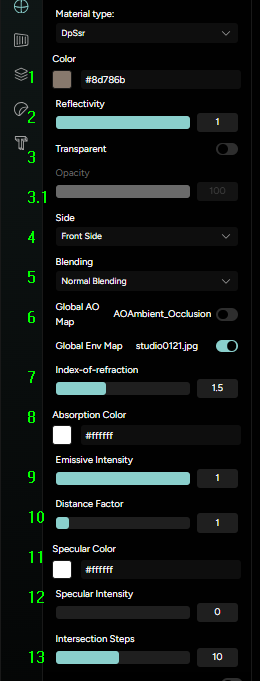
- Color - determines the base color of the liquid;
- Reflectivity - determines the reflectivity of the volume - best used when the container and liquid are identical;
- Transparency - determines the transparency level of the liquid volume, through Opacity slider (Marked 3.1 in Figure 5);
- Side - sets the rendered face orientation;
- Blending - sets the type of blending for the liquid volume in relation to the order of the parts in the scene;
- Global AO/Env - determines the usage of global maps for the glass/liquid material;
- Index of refraction - determines the refraction level of the light within the liquid;
- Absorption Color - determines the reactive color of the liquid in relation to the light color;
- Emissive Intensity - sets the emissive intensity of the liquid;
- Distance factor - simulates the distance of the light source that affects the liquid visuals;
- Specular Color - sets the specular color of high tones in the liquid;
- Specular Intensity - sets the intensity of the high tones in the liquid (highlights);
- Intersection Steps - determines the number of refractive calculations for the DpSSr.
Due to its complexity, DpSSr Shader offers numerous additional controls that allow for precise fine-tuning of the final visual output, as well as some performance optimizing:
- Standard PBR inputs - carryovers from the default shader setup;
- Alpha Test - sets the alpha threshold for opacity value in the final render;
- Depth Function - sets which Depth Function is used for the final render output;
- Depth Write - determines whether rendering this material has any effect on the depth buffer;
- Depth Test - determines whether to have depth test enabled when rendering this material;
- Clip Intersection - determines the visual outcome of the clipping planes;
- Clip Shadows - determines whether to clip shadows according to the clipping planes specified on this material;
- Color Write - determines whether to render the material’s color;
- Flat Shading - optimizes render output of shading;
- Fog - determines the density of DpSSr visual based on the viewing distance;
- Lights - toggles the impact of additional lights;
- Polygon Offset - toggles the depth offset calculation for the final render output;
- Polygon Offset Factor - sets the factor for the polygon offset;
- Polygon Offset Units - sets the units of calculation for the polygon offset;
- Premultiplied Alpha - toggles the computation for visual compositing of scene elements with alpha channels;
- Dithering - toggles noise for color correction;
- Shadow Side - defines the shadow rendering side;
- Vertex Colors - toggles Vertex colors;
- Side Separate Culling - displays Side Separate Culling effect.