Fur Shader
Fur Shader is a Custom Shader that is engineered to manufacture the soft, puffy appearance of the fur material by layering the base material through levels of differing opacity and displacement scale. Parameters for controlling the final visual output of the Fur Shader involve (Listed as Marked in Figure 1):
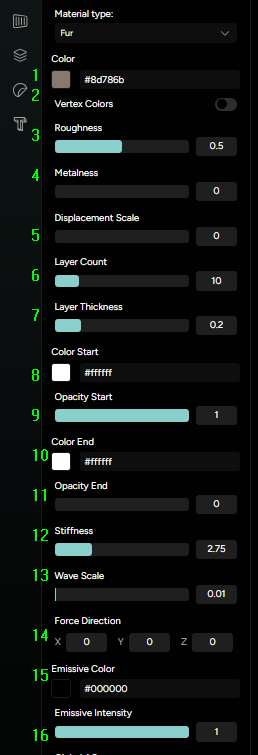
- Color - sets the base color value of the Fur Material;
- Vertex Colors - toggles whether the Fur Shader accounts for Vertex paint;
- Roughness - determines the Roughness parameter of the Fur Material;
- Metalness - determines the Metalness parameter of the Fur Material;
- Displacement Scale - determines the Displacement value of the material;
- Layer Count - determines the offset amount of Fur Shader layers;
- Layer Thickness - determines the perceived thickness of Fur Shader layers;
- Color Start - determines the color of the Fur base layers;
- Opacity Start - determines the Opacity value of the Fur base;
- Color End - determines the color of the Fur top layers;
- Opacity End - determines the Opacity Value of the Fur top;
- Stiffness - determines the stiffness of the Fur appearance by increasing the straightness of the projected displacement;
- Wave Scale - adds a wave function to the displacement projection;
- Force Direction - sets the perceived intensity of the displacement force based on camera angle;
- Emissive Color - sets the overall Emissive color of the Fur Material;
- Emissive Intensity - sets the intensity of the Emissive Fur color;
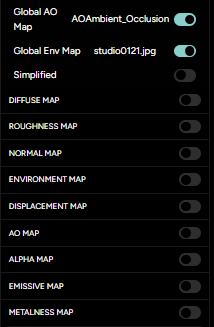
The Fur Shader also allows for carrying over some of the PBR Material parameters from the base Physical Shader, or a reduced version of those - controlled by the “Simplify” toggle switch (Figure 2).