Custom Shaders
Sometimes, the material properties of certain products are hard to convey through standard PBR settings, and more often than not, they require Specialised Shaders that are tailored to that product’s unique features. Developing these shaders is an industry on its own, and as something that encompasses a great deal of 3D development, it is present in the Threedium Platform. This document intends to cover in detail all the available shaders on the Platform, as well as some of the more open-end options that accompany them.
Introduction
Custom Shaders are of great importance for the WEB3D development, not only because they faithfully recreate the real life properties of certain products, but they also play a great deal in delivering complex visuals through optimal means, without layering assets and assets of real-time transfer size. They are product-tailored engineering and creative workspaces that were developed to accommodate some of the most common e-commerce deliverables - something that Threedium has years of experience with. Specialised Shaders on the platform include:
- Diamond Shader - Used for conveying the fractal properties of Diamonds and other jewelry assets;
- Fur Shader - Used for conveying varying degrees of Fur fluffyness, thickness, softness;
- Depth-peeling Screen Space Reflections (DpSSr) - Used for conveying the light-dispersive properties of fluids;
- Reflector - Used for conveying the reflective properties of metallic and one-way-glass materials.
Aside from these, there are options for Custom-coded OpenGL Shaders (GLSL Shaders) that allow for ambitious creative undertakings and vfx-like visuals.
Location
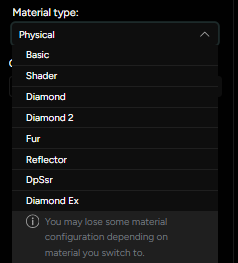
All Shaders are accessed in the Material type menu (Figure 1), where a standard Physical Shader can be converted to some of the specialised Custom Shaders.