Introduction
Well organized and intuitive UI is a key factor in getting a hold of a new toolset. The Threedium Platform has all of its features neatly organized into a cohesive and easy-to-follow-through interface, that is synonymous with most of the known 3D Modeling Softwares. This document intends to deconstruct the Platform’s infrastructure for easier understanding of newcomers and reference fallbacks for advanced users.
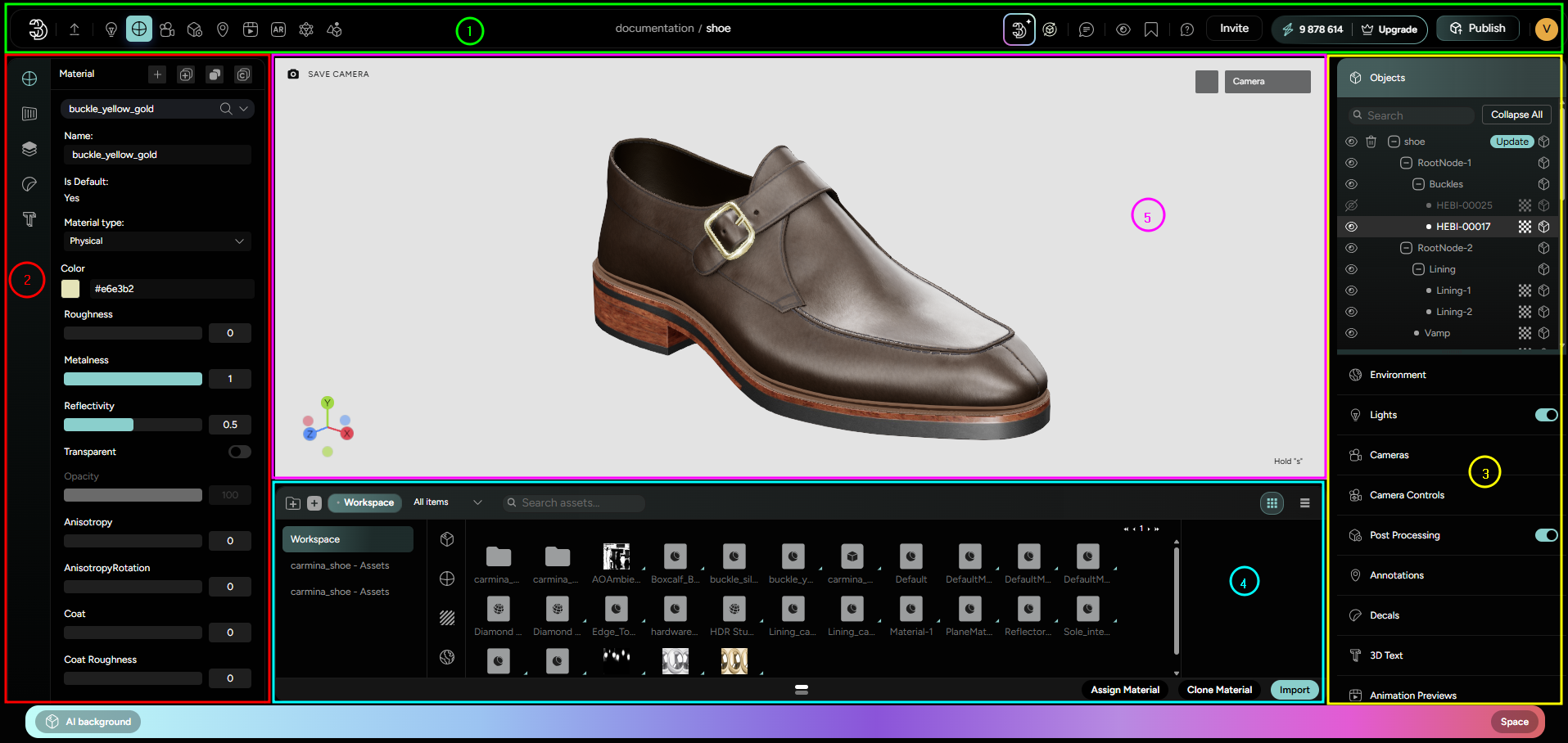
Once the user clicks on a Workspace to open it, a 3D Scene with accompanying interface shows up. This essential part of the Platform’s workspace is what we call a 3D Designer, or an Editor (even though the word “editor” is associated colloquially with the left-side panel where all the editing options are available). The 3D Designer is divided into 5 major regions (marked 1-5 in Figure 1. and listed in corresponding order):
- The Editor Tab/The Main Ribbon - Marked with Green in Figure1
- The Left-side Editor Menu - Marked with Red in Figure1
- The Right-side Object and Scene Menu - Marked with Yellow in Figure 1
- The Library - Marked with Blue in Figure1
- The 3D Scene/3D Viewport - Marked with Pink in Figure1