Getting Started with Threedium Platform
This document summarizes all main Features of the Threedium Platform and categorizes them based on the complexity of the workflows that they constitute. This is done with the purpose of helping the Platform’s Artists get a head start on planning their workflows and integrating Threedium Platform into their routine. The workflows are ranked as Basic, Intermediate and Advanced, along with Material setup that is specific and therefore requires a dedicated section.
Introduction
Threedium Platform incorporates most of the standardized WEB3D workflows, from setup to Publish. Finding one’s own way around is pretty intuitive, once the User gets a hold of the tools and their arrangement. The key is grasping that the Features available in the Editor are listed out in chronological production order (Figure 1.).
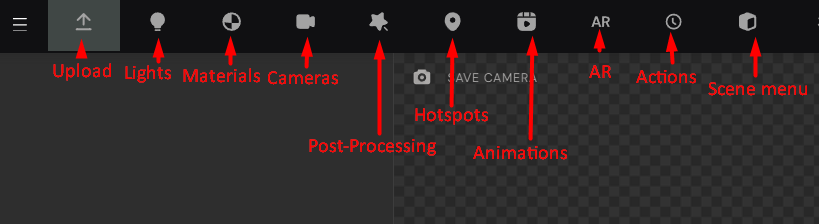
Once the User gets a hold of this, it is easy to streamline workflows and organize pipelines: from basic operations to large-scale undertakings.
Basic workflow
No matter the scale of the Project, all workflows share several core steps: Upload, Light and Camera settings.
Uploading a 3D Model to the Threedium Platform is as easy as dragging and dropping the appropriate 3D file in the Scene space. Alternatively, the User can open the Upload tab and choose a designated file from their local workspace.
Setting up Lighting is integral to any 3D Project, because it determines the qualities that we want to bring out in our Project. In the Threedium Platform’s Platform, the Lighting options are available in the Lights tab, right after the Upload button. There, a User can set up the desired light configuration, from the global HDR map and its settings, to the additional light objects and Occlusion maps - all with the purpose of simulating the likeness of the product and highlighting its real-life feel and presence.
Lastly Camera settings allow the original artist to direct the attention and experience of the end-users, carefully curating the viewer’s perspective and level of closeness with the product, that would otherwise be gated by the product’s physical accessibility. Camera settings allow us to determine the selling shots, frame the best features, shift between impressionable and technical observations.
Understanding this three-part process is a key to any successful presentation. Anything that comes afterward is just a build-up on the established foundation.
Intermediate setups
More advanced setup includes adding features that enhance the product’s presentation, without requiring preemptive planning. These features aren’t necessary, but are always welcomed and they are proven to boost engagement. They also require a more in-depth understanding of the end-result and ways to boost product’s appeal. Said features include: Post-Processing, Augmented Reality (AR) and Viewport settings.
Post-Processing is a feature that consists of a set of tools to enhance the product’s appeal, by manipulating the final rendering output. Here, the Artist can make deliberate and personal aesthetic choices in order to share their vision, whether that be through blooming the highlights and light effects, color grading the Scene, or eliminating the graphic noise. When used in conjunction with specific material types, Post-Processing can massively improve the reception of the product, but it takes keen eye and visual experience.
Augmented Reality is another fun feature that lets the end-users project the product into their real-life environment. All AR files are obtainable in the Threedium Platform space, which makes this feature unavoidable, once the artist gets a hold of it.
Viewport settings determine the kind of simulated environment that a product will be placed in for the final display. It also facilitates positioning the product and enabling some of the staple 3D visual features, such as Ground plane and its possible Reflections. Just like features above, Viewport settings are meant to contribute to the very specific creative visions whose enactment goes a long way for a product’s presentation.
Advanced workflows
Advanced workflows require preemptive planning and local 3D Model preparation that should be coordinated around a creative vision. This includes Animations, Actions and Hotspots - key features used in delivering more complex and interactive Product explorers, Configurators and Story telling pieces.
Hotspots play a key role in diversifying the user experience by layering interactions through symbolic command points.
Said interactions could either be Animations - simulated sequences of a Product and its functions, or Actions - initiated Transitions of a Product that depict various state changes and appearances.
The possibilities for a high-satisfaction user experience with these features are limitless, and programming the user experience with them is a design workflow on its own, because of their cohesion and integrability.
Material setup
Material setup is a process that depends on the Artists preferences and therefore is supported by Threedium’s engine from multiple approaches. The artist can prepare all the materials locally and upload them as such to the Platform, without any further work needed, or they can set up the Materials directly on the Platform, either with standard PBR parameters, or by using Threedium’s custom Shaders that optimally and effortlessly convey the nature of certain commerce goods, such as Diamonds, Fur and Liquid. Threedium Platform also facilitates personal custom-coded Shaders for Artists of great aspirations. This design stage is as complex as one needs it to be.
Because of the range of possibilities that Material setup covers, it is sorted as a workflow of its own, because it is tailored to Artist’s needs. Nevertheless, this phase is all-encompassing and everpresent - it constitutes all stages of the delivery process and requires regular followthrough on every step. Whether it is accounting for Light intensity, preparing for AR, or setting up Color Transitions, working with Materials is working with literal fabric of the projected digital reality.
Work pipelines based on Product goals
Another easy way to integrate the Threedium Platform into one’s practice is to approach it from the perspective of the Project end-goals. There are several main e-commerce product groups that can be delivered with full integration by using Threedium Platform. The following breakdown should explain in detail how the Threedium Platform enables smoother and more streamlined cross-disciplinary work:
3D Viewers- simple 3D Scenes with basic Camera motion enabled - Requires Basic - Intermediate level workflows with a ready-made integration link;Product Explorers- 3D Viewers that pack a bit more details - Requires Intermediate - Advanced level workflows with a ready-made integration link;Configurators- 3D experiences that offer maximum engagement through User personalization - Requires Advanced level workflows with minimal developer support (API calls);Storytelling pieces- Immersive digital mix-media experiences - Requires Advanced level workflows with strong developer support ;
It is worth noting that for all product types, Threedium Platform minimizes Developer input, while allowing Artists to maximize efficiency and creativity.
Summary
Threedium Platform is a handy Platform that streamlines e-commerce workflows just by being put to use. Not only does it neatly organize and compartmentalize production across multiple levels and disciplines of work, it also comes with an internal Collaboration system that serves as an excellent communication and feedback tool, which further boosts efficiency and productivity.